A guest article by SmartRace user Scott McGlynn
Click here to view Scott’s project on Github
I really enjoy using Smatrace on my Carrera digital track. My friends and I have been doing a winter race series now for the last three years and getting together these occasional Saturday evenings has been quite a lot of fun. SmartRace really adds to that by managing details of the championship but also by adding a strategic element along with a little luck. These additions mean that any racer can win on any given race with any car. That possibility really makes it fun for everyone.
Over the course of the evenings we alter rules, courses, and race setups in an effort to keep the fairness as even as possible while also minimizing the worst part of a slot car race: the dreaded track call. Nothing is more disappointing than being in the groove and working on a close battle for position when suddenly the race is stopped and we have to retrieve an errant car for the umpteenth time that evening.
The first technique we used was simply yelling “Stop”. As you can imagine, some drivers developed convenient hearing. My next step was to try SmartRace connect as a requirement for all drivers and then they each have their own stop button. Unfortunately that didn’t work well either for a couple of reasons. One, there is limited space on my track table to safely lay a phone for all drivers. Two, my network often got too slow to be reliable when four or more drivers had SmartRace connect running. I’m still trying to figure out how to solve that because several of us love using the race radio. It always works flawlessly with one driver but something isn’t right when we add more and I’m pretty sure it is my network and not SmartRace (I intend to develop some troubleshooting tools to find out what is issue is). The next technique was hardwiring stop buttons directly to the CU for each driver. I bought four industrial grade emergency stop buttons and wired them all in parallel with the start button on the CU and it worked great.
But not really. It turns out that all the reasons I like using SmartRace (weather, fuel, DRS) cause a lot of reprogramming of cars on the fly during a race. That by itself isn’t an issue but the problem comes when someone hits the stop button while the CU lights are dancing their reprograming dance. The CU completely ignores that the hardware stop switch was pressed and it never does anything about it. Consequently, panicked drivers would hit the button over and over; then sometimes other drivers would try to help and hit their button too. Finally after the CU finishes whatever reprogramming it is doing, button presses become active and now a flood of them come in. The cars stop and then the next press immediately starts the five light count down to restart the race.
This just wasn’t working at all. We went back to yelling “Stop!” for the first race of this winter.
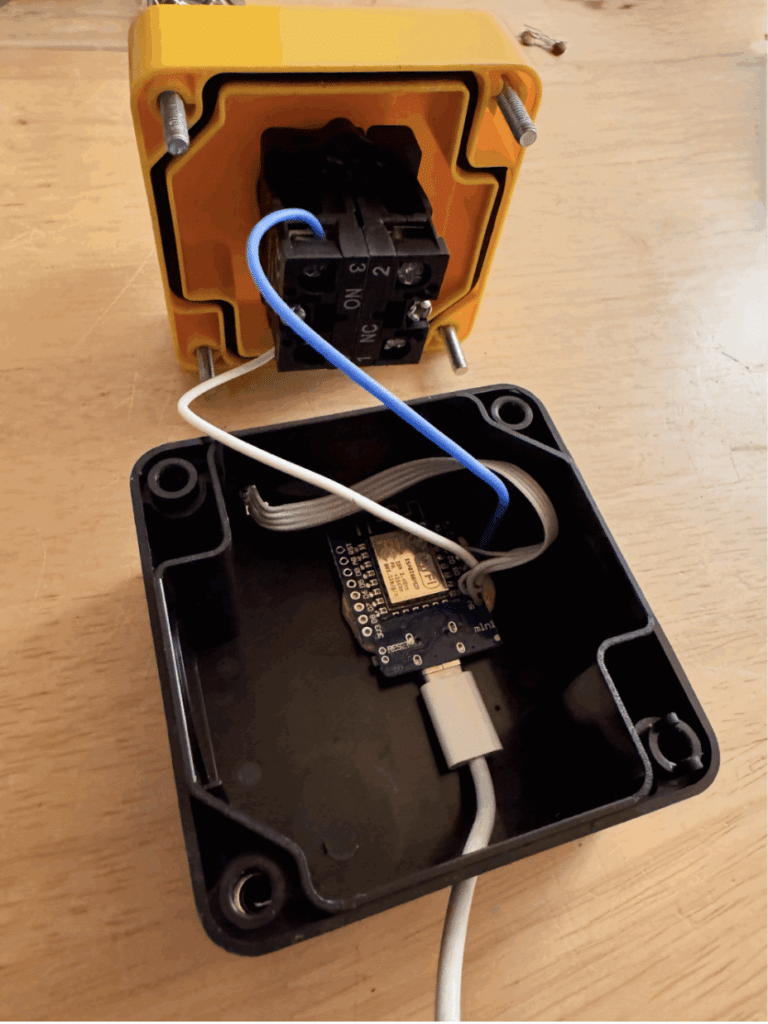
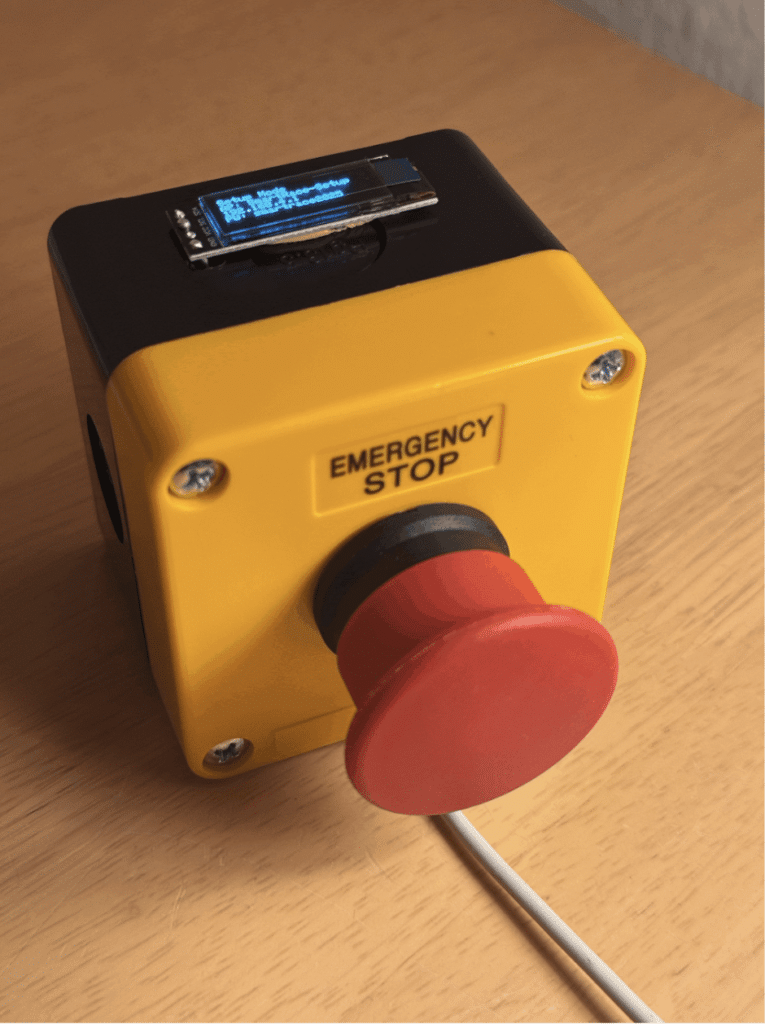
Then I saw that Marc published the protocol for SmartRace Connect along with a sample page. On that sample page was the stop button just like on the app. More importantly, SmartRace queues the stop event so if you press it while the CU is busy, it will still issue the stop command once the CU is ready for it. This then sent me down a rabbit hole of “what is the cheapest smallest way I could make my stop buttons trigger that SmartRace Connect stop” and this is what I finished with.
Each of the stop buttons I already had now has a tiny wifi controller and a 128 x 32 pixels screen on top. The power comes from a USB charger. Once plugged in and set up, each stop button registers with SmartRace as a SmartRace Connect device. The display then shows fuel level with a bar as well as a percentage readout. Hitting the stop button changes the display to say “STOPPED!” so you know it registered. The race stops immediately if the CU isn’t busy, or it stops as soon as the CU finishes its current car programming due to a tire change, weather change, DRS, fuel, etc. Upon completion of the race, each display tells you what your finishing position (post penalties) was.
When re-assigning the controllers, like when you go to the next event of a championship, the name of the driver and their car is displayed on the unit. I’ve found that getting everyone to pay attention to their next station and car assignment always slows everything down. I hope that this feature will help speed that part of the evening along. The driver and car display remain on until the stop button is pressed or when the next event starts.
The total cost in parts for the four stations was only $70. I originally was thinking about buying four cheap android tablets and making mounts for them but that was going to cost me at least $200 and I read mixed reviews about the usability of those $50 tablets.
Each station has:
- 1x industrial grade emergency stop button – $11 (could save much by 3D printing your own)
- 1x ESP 8266 board – $2.50
- 1x I2C 128 x 32 display – $3.00
I had enough spare cables and chargers to power them all.
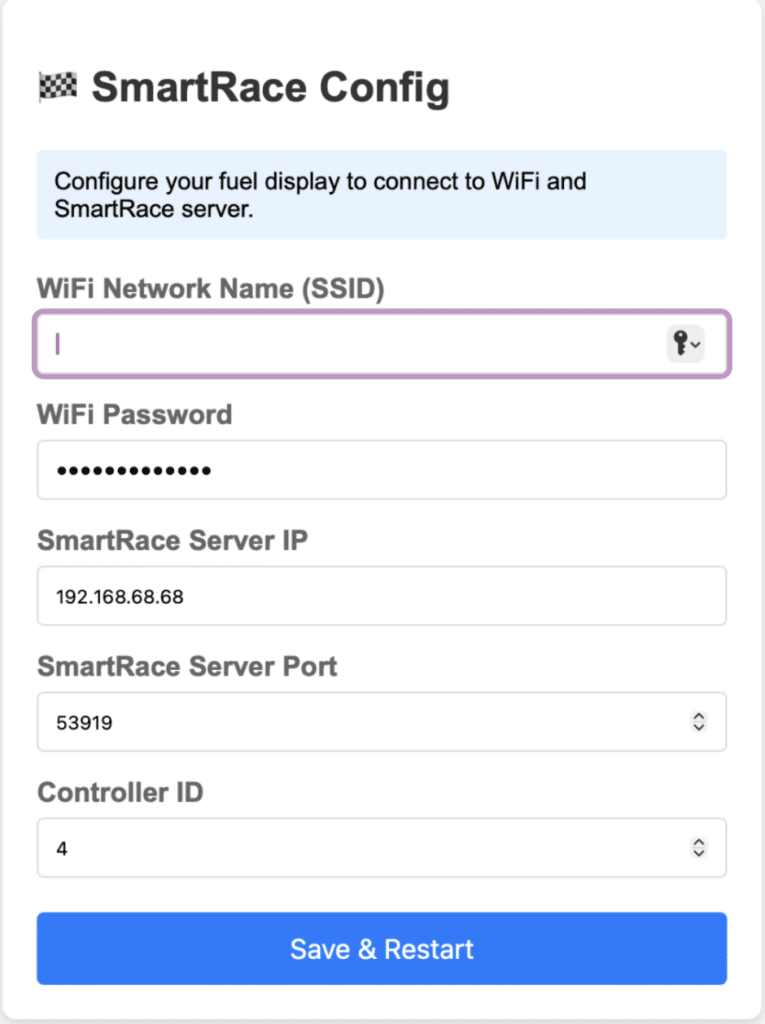
When I wrote the code to run it all, I learned much about Web Sockets (thank you for the extra help Marc!) as well as writing code for these tiny ESP32 based devices. It’s been really fun to explore the possibilities. I am amazed at what it can do like the wifi AP and server for set up. Once you save the set up, the device reboots and connects to your WiFi, and then your SmartRace server (messages display the progress on the screen). Once done, it switches to display the fuel level of the selected controller and is ready for action. If anyone is interested in the code, I’ll publish it on Github. Contact me at scottmcglynn on the SmartRace Discord server if you have any questions.